Blog

  • How Does Jewelry ERP Integrate POS and Shopify?

    How Does Jewelry ERP Integrate POS and Shopify?

    Jewelry ERP POS Shopify integration is the process of connecting enterprise resource planning (ERP) software designed for jewelry businesses with both point-of-sale (POS) systems and online stores powered by Shopify. This integration creates a unified environment where data flows seamlessly across in-store and online channels. Inventory, customer orders, pricing, and reporting all synchronize in real time, ensuring that jewelers avoid stock discrepancies, improve customer satisfaction, and simplify operations.

    Modern jewelers often juggle multiple systems. They may have a POS solution for their showroom, a Shopify-powered eCommerce website, and back-office ERP software to manage accounting, vendors, and compliance. Without integration, these platforms operate in silos, creating inefficiencies. Jewelry ERP software acts as the central hub, linking everything together so business owners gain a complete picture of sales and operations without double entry or manual reconciliation.

    By uniting POS and Shopify with ERP, jewelers benefit from greater accuracy, streamlined workflows, and the ability to deliver consistent service both in-store and online.

    Why Integration Matters for Jewelry Businesses

    The jewelry industry faces unique challenges compared to other retail sectors. High-value inventory, complex item attributes, and varying regulations on diamonds and precious metals mean that generic retail solutions often fall short. Integrating POS and Shopify with a jewelry-focused ERP system provides several critical advantages.

    First, inventory management becomes much more accurate. Jewelry products often have one-of-a-kind attributes such as carat weight, gemstone quality, and precious metal composition. If a ring sells in the showroom, the ERP instantly updates Shopify to remove it from available stock, reducing the risk of selling the same item twice.

    Second, integration reduces administrative overhead. Without connected systems, staff must manually update stock counts and customer orders, which is time-consuming and prone to errors. With an ERP integration, transactions flow automatically between Shopify, POS, and ERP.

    Finally, reporting and analytics become more powerful. Jewelers can see sales performance by channel, product line, or customer group in one central dashboard. This visibility helps identify trends, optimize purchasing, and plan marketing campaigns more effectively.

    Benefits of jewelry ERP POS Shopify integration

    The benefits of connecting ERP, POS, and Shopify for jewelers extend far beyond convenience. Key advantages include:

    • Unified inventory management: Accurate stock levels across all channels reduce errors and stockouts.
    • Real-time data synchronization: Sales, returns, and adjustments update instantly across POS, ERP, and eCommerce.
    • Improved cash flow visibility: Integrated systems show cash, deposits, and receivables without manual reconciliation.
    • Reduced administrative workload: Automated data sharing saves time and prevents duplicate work.
    • Scalable foundation for growth: Jewelers can expand to multiple stores or eCommerce channels without IT headaches.
    • Enhanced compliance and traceability: Integration makes it easier to track diamonds and precious metals for audit and certification purposes.

    In short, integration provides both operational efficiency and a strategic advantage in a competitive retail landscape.

    Challenges to watch during integration projects

    While the benefits are compelling, integration projects require careful planning. Some of the common challenges include:

    • Data mapping complexity: Jewelry items often have many unique attributes that must be mapped consistently across ERP, POS, and Shopify.
    • System compatibility: Not all POS and eCommerce platforms connect easily with jewelry ERP solutions. Selecting the right middleware or APIs is critical.
    • Change management: Staff may need training to adopt new workflows, especially if they are used to manual updates.
    • Cost considerations: Integrations involve both upfront configuration and ongoing maintenance, so budgeting is important.
    • Testing requirements: Integration must be thoroughly tested before going live to avoid errors during peak sales periods.

    By anticipating these challenges, jewelers can work with experienced ERP providers to ensure smooth implementation.

    Steps to Connect ERP With POS and Shopify

    Integration is a structured process. While every project has unique elements, most follow a series of steps to ensure successful connectivity between ERP, POS, and Shopify.

    Step 1: Assess business needs

    The first step is to clarify what the business wants to achieve. For example, some jewelers focus on real-time inventory, while others prioritize consolidated financial reporting. Clear objectives guide the integration strategy.

    Step 2: Select compatible systems

    A jewelry ERP solution designed for the industry should already include connectors or APIs for POS and Shopify. Verifying system compatibility upfront prevents costly workarounds later.

    Step 3: Plan data structures

    Because jewelry products often have detailed specifications, data structures must align across platforms. For example, attributes such as diamond cut, color, clarity, and carat weight must map correctly to Shopify’s product listings and the POS catalog.

    Step 4: Configure integrations

    This step involves setting up APIs, middleware, or native connectors between the ERP, POS, and Shopify. Vendors like Business Computing provide specialized connectors that minimize complexity and reduce manual coding.

    Step 5: Test thoroughly

    Before going live, integrations should be tested under different scenarios, including sales, returns, exchanges, and inventory adjustments. Testing ensures that data flows correctly and that no gaps remain.

    Step 6: Train staff

    Employees must understand how the integrated systems work together. Training should focus on daily workflows such as processing sales, checking inventory, and handling online orders.

    Step 7: Monitor and optimize

    After implementation, businesses should monitor integration performance and make adjustments. As the company grows or adds new channels, integrations may need fine-tuning to handle additional complexity.

    How integration improves customer experience

    Integration does more than streamline operations; it also enhances the customer journey.

    • Consistent product availability: Customers can shop with confidence knowing that the stock shown online is accurate.
    • Faster order fulfillment: Real-time synchronization reduces delays in shipping online purchases or preparing in-store pickups.
    • Seamless omnichannel experiences: Customers can browse online, purchase in-store, or request services across channels without friction.
    • Better service through insights: Integrated customer data helps staff provide personalized recommendations and aftercare.
    • Trust in brand professionalism: Customers value businesses that operate smoothly and transparently, building loyalty and repeat sales.

    For jewelers, customer trust is everything. Integration ensures that operations match the high standards customers expect when purchasing luxury items.

    Empower Your Jewelry Business with Integration

    Jewelry ERP POS Shopify integration is not just about technology. It is about building a unified foundation for growth, efficiency, and customer satisfaction. By connecting sales channels and back-office operations, jewelers reduce errors, gain insights, and deliver a better shopping experience across every touchpoint.

    At Business Computing (BCI), we specialize in making this vision a reality. As a Microsoft Partner and developer of e-Jewelry Software©, we understand the unique requirements of jewelry and diamond businesses. Our mission is to provide software that is intuitive, full-featured, highly integrated, and easy to use, all while running smoothly for every jeweler, diamond trader, or importer. We have helped hundreds of jewelry companies access tailored ERP solutions that align with industry standards and empower them to grow with confidence.

    If you are ready to connect your POS and Shopify with a powerful jewelry ERP system, we invite you to explore how Business Computing can transform your operations. Contact us to learn more and take the first step toward a smarter, more unified future for your jewelry business.
  • How Does Dynamics 365 Handle Jewelry Inventory Tracking?

    How Does Dynamics 365 Handle Jewelry Inventory Tracking?

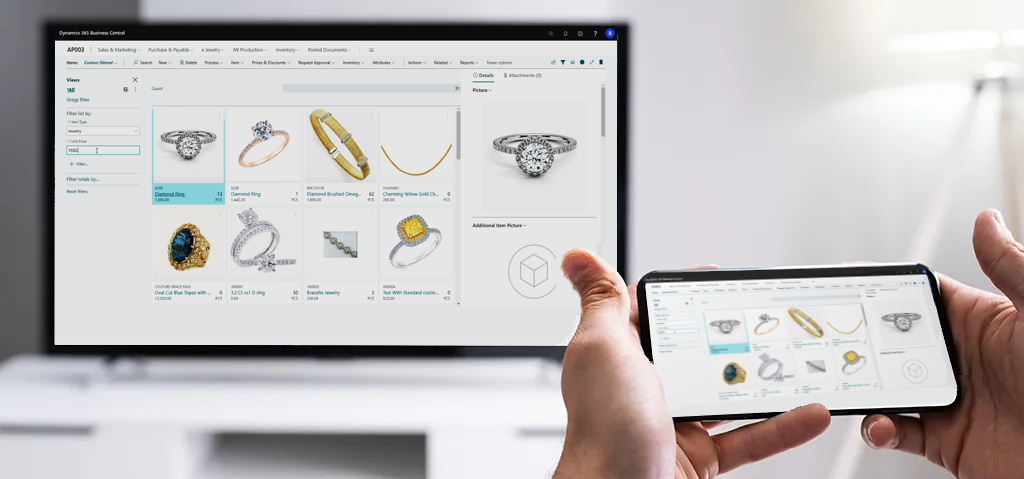
    Managing jewelry inventory is one of the most complex challenges for businesses in the retail, wholesale, and manufacturing segments of the industry. Precious metals, gemstones, finished pieces, and custom designs all carry unique values and require precise tracking to maintain profitability and trust. Dynamics 365 jewelry inventory tracking provides jewelry businesses with the specialized tools they need to streamline inventory processes while maintaining accuracy and transparency. By leveraging an ERP system tailored for jewelry businesses, companies can unify their operations, reduce manual effort, and ensure that every diamond, gemstone, and finished piece is accounted for across the supply chain.

    Jewelry Inventory Tracking in Dynamics 365

    The jewelry industry faces unique challenges that differ from typical retail operations. Tracking gold, diamonds, gemstones, and other precious assets requires more than a standard point-of-sale or inventory solution. With Dynamics 365, businesses gain a centralized system designed to handle the nuances of jewelry operations.

    Key features of Dynamics 365 jewelry inventory tracking

    1. Multi-location management: Jewelry businesses often operate across multiple retail stores, manufacturing sites, and distribution centers. Dynamics 365 provides full visibility across all locations, ensuring managers can see where every item is, from raw stones to finished pieces.
    2. Serialized and lot tracking: Every diamond or precious gemstone can be tagged and tracked individually using serial numbers or lot numbers. This ensures compliance with industry standards and makes it possible to trace items throughout their lifecycle.
    3. BOM (Bill of Materials) support: Jewelry manufacturing involves assembling multiple components such as gemstones, settings, and metals. Dynamics 365 allows for detailed BOM tracking so businesses can measure costs and inventory usage accurately.
    4. Weight and purity management: Unlike general retail, jewelry requires monitoring by weight and quality. Dynamics 365 enables precise measurement of carat weight, metal purity, and other attributes.
    5. Integration with POS systems: For retailers, inventory ties directly to point-of-sale operations. Dynamics 365 ensures that every sale updates inventory records in real time.
    6. Regulatory and compliance tracking: Jewelers must comply with regulations around sourcing and valuation. Dynamics 365 makes it easier to store certificates, maintain documentation, and track origins.

    Examples of inventory control in action

    • A wholesale distributor can assign serial numbers to each diamond in its stock, enabling full traceability from supplier to customer.
    • A retailer can monitor real-time stock levels across multiple storefronts, preventing overstocking in one location and shortages in another.
    • A jewelry manufacturer can track raw gold bars used in production, recording the exact weight converted into finished rings or necklaces.

    These examples show how Dynamics 365 creates transparency and control in a business where accuracy is critical.

    Integrations that support jewelry inventory tracking

    Dynamics 365 does not work in isolation. Jewelry businesses can connect the platform to other essential systems:

    • e-commerce platforms for online retail operations
    • Accounting and financial management tools for seamless reconciliation
    • Supply chain management systems to streamline vendor and logistics processes
    • e-Jewelry Software©, a solution from Business Computing (BCI), that adds industry-specific functionality tailored to jewelers, diamond traders, and wholesalers

    By leveraging these integrations, companies can ensure that their inventory tracking system is part of a broader ecosystem designed to handle every aspect of jewelry operations.

    Benefits of ERP-Based Inventory Management

    Moving inventory management into a full ERP system like Dynamics 365 offers benefits far beyond simple stock counts. Jewelry businesses need detailed visibility, financial accuracy, and the ability to serve customers with confidence.

    Streamlined operations

    ERP-based inventory management centralizes data, eliminating the need for multiple disconnected systems. This means fewer errors, less manual entry, and faster decision-making.

    Cost control and profitability

    By tracking every gram of gold and every carat of diamond, businesses gain precise cost visibility. This enables accurate pricing, prevents losses, and improves profitability.

    Improved customer satisfaction

    With real-time inventory data, sales staff can provide accurate information to customers. Whether a buyer is looking for a specific diamond cut or a custom piece, employees can quickly determine availability.

    Scalability

    ERP solutions are designed to grow with a business. As jewelry retailers expand into new locations or wholesalers enter new markets, Dynamics 365 scales to match their evolving needs.

    Improving Accuracy with Real-Time Tracking

    Inventory tracking is not just about recording what is in stock. It is about knowing in real time where each item is, how much it is worth, and how it is moving through the business.

    Advanced automation and reporting

    Dynamics 365 provides automated workflows that reduce manual data entry and errors. Reports can be generated instantly, offering insights into sales trends, stock turnover, and valuation.

    Barcode and RFID technology

    Jewelry businesses can use barcodes and RFID tagging to track items with speed and precision. Scanning ensures accuracy at every stage, from receiving shipments to customer sales.

    Real-time alerts

    With Dynamics 365, businesses can set alerts for low stock levels, unusual variances, or high-value transactions. This level of oversight ensures that inventory discrepancies are addressed before they become costly issues.

    Data-driven decision-making

    Access to real-time data means that managers can make smarter decisions. For example, identifying which items are fast-moving versus slow-moving allows businesses to adjust purchasing and production accordingly.

    Why Dynamics 365 is Ideal for Jewelry Businesses

    Jewelry businesses cannot afford errors in inventory tracking. A misplaced diamond, an inaccurate weight, or a missed certificate can result in significant financial losses and reputational damage. Dynamics 365 provides the tools needed to prevent these issues while improving efficiency.

    Key reasons it stands out:

    • It supports specialized attributes like carat weight, clarity, color, and cut for gemstones.
    • It integrates manufacturing processes with sales and inventory, ensuring seamless flow from raw material to finished piece.
    • It offers role-based dashboards for sales teams, production managers, and executives, ensuring everyone sees the data most relevant to them.
    • It connects to industry solutions like e-Jewelry Software© from Business Computing, which provides additional features built exclusively for jewelers and diamond businesses.

    Contact Us Today

    At Business Computing (BCI), we know that jewelry businesses need more than a generic ERP system. They need a solution built for the complexities of the jewelry trade. As a Microsoft Partner and the developer of e-Jewelry Software©, we have dedicated our mission to creating intuitive, integrated, and full-featured solutions that help jewelers, diamond traders, and importers succeed.

    With Dynamics 365 jewelry inventory tracking and the enhancements provided by e-Jewelry Software©, your business gains the precision, efficiency, and scalability needed to thrive in today’s competitive market.

    If you are ready to transform the way you manage your jewelry inventory and streamline your operations, explore how our solutions can help. Contact us today and discover a jewelry ERP solution tailored to your unique needs.

  • What Is the Jewelry ERP Implementation Step-by-Step Process?

    What Is the Jewelry ERP Implementation Step-by-Step Process?

    Implementing an enterprise resource planning (ERP) system is a transformative step for any jewelry business. The jewelry ERP implementation process involves carefully moving from initial discovery and planning to full system deployment and adoption. For jewelry and diamond businesses, this transition is particularly impactful because it integrates design, manufacturing, distribution, inventory management, and sales into a single streamlined platform. Done right, ERP ensures jewelers can manage every detail of their operations while remaining responsive to customer demands and market trends. Below, we break down the ERP journey for jewelry businesses into clear, practical stages.

    Jewelry ERP Implementation Process Explained

    Introducing an ERP system into a jewelry company requires more than just software installation. It is a strategic shift that changes how the business operates on a daily basis. A jewelry ERP solution must account for industry-specific processes such as gemstone grading, diamond certification, consignment tracking, hallmarking, repairs, custom orders, and integration with point-of-sale (POS) systems.

    By mapping out a structured implementation process, jewelry businesses can minimize disruptions, increase efficiency, and ensure employees feel confident using the system. In this section, we’ll explore the overall phases that make up a jewelry ERP deployment.

    Key phases in the jewelry ERP implementation process

    1. Discovery and Needs Analysis
      At the beginning, the ERP partner collaborates with the jewelry business to assess workflows, pain points, and objectives. For example, a diamond wholesaler may struggle with the traceability of stones, while a retailer may need tighter inventory controls across multiple stores.
    2. Planning and Project Scoping
      A roadmap is created with timelines, budgets, milestones, and clear expectations. This phase ensures the ERP implementation aligns with the company’s short- and long-term growth goals.
    3. Customization and Configuration
      Jewelry businesses often require unique modules such as metal purity tracking, custom order design management, or GIA certificate integration. The ERP software is tailored to fit these requirements.
    4. Data Migration
      Migrating existing data, such as customer records, supplier information, product catalogs, certificates, and historical sales, is critical. Cleaning and validating this data is essential to avoid future errors.
    5. Training and Testing
      Employees are trained on how to use the ERP in their daily roles. User acceptance testing (UAT) allows teams to validate that the system works properly before going live.
    6. Go-Live and Support
      Once the ERP system is ready, the business transitions to live usage. Ongoing support ensures users adapt smoothly and issues are resolved quickly.

    Step-by-Step Guide to Jewelry ERP Implementation

    With the big picture outlined, let’s go deeper into each stage of ERP implementation tailored for jewelry companies.

    Step 1: Discovery and Requirement Gathering

    This phase is about listening and learning. Consultants and stakeholders work together to map every aspect of the jewelry business. Do you need integration with CAD design tools? Are you selling both wholesale and retail? Is compliance with international diamond regulations a concern?

    The answers shape the solution. For instance, a jeweler focused on bridal jewelry will need different ERP workflows compared to a diamond importer with a global supply chain. By documenting these requirements early, the ERP partner ensures no business-critical function is left unaddressed.

    Step 2: Planning and Scoping

    Next, the project team establishes a realistic plan. The planning stage defines:

    • Which ERP modules will be implemented first
    • Budget allocations
    • Deployment strategy (phased rollout vs. big bang approach)
    • Success metrics (e.g., reduced inventory shrinkage, faster order fulfillment)

    Jewelry businesses often prefer phased rollouts, starting with inventory and sales modules, followed by manufacturing or repair modules later. This reduces risk and allows users to adapt gradually.

    Step 3: Customization and Configuration

    No two jewelry businesses are alike. A high-end diamond retailer may require advanced certificate management, while a custom jeweler needs flexible job order tracking. ERP systems like e-Jewelry Software© are designed to be adapted, ensuring every unique requirement is met.

    Customization may include:

    • Metal purity tracking (10K, 14K, 18K, 22K)
    • Gemstone grading and certification links
    • Multi-currency support for international trading
    • Repair and service order management
    • Barcode or RFID integration for stock handling

    Configuration tailors the ERP environment so it feels intuitive to end-users while handling the complexity of jewelry operations in the background.

    Step 4: Data Migration

    One of the most sensitive steps, data migration involves extracting existing data from legacy systems or spreadsheets and importing it into the new ERP. Jewelry businesses often manage large product catalogs, customer histories, and supplier contracts.

    This step requires:

    • Data cleansing (removing duplicates, correcting errors)
    • Mapping fields from old systems to new ERP structures
    • Running migration trials to confirm accuracy

    Because jewelry inventory is high-value, even small errors in stone weights, prices, or certification details can cause major issues. Careful validation ensures integrity and trust.

    Step 5: Training and Testing

    ERP is only successful if employees use it effectively. Comprehensive training programs help employees understand new workflows. Training may be role-specific: for example, sales staff learn POS integration, while production teams learn job order management.

    During testing, the business runs real-world scenarios:

    • A custom engagement ring order
    • A diamond consignment transfer
    • A repair request with customer tracking

    User feedback ensures the system is intuitive and reliable. This stage also helps build confidence before the official launch.

    Step 6: Go-Live and Continuous Support

    Once everything is ready, the ERP system goes live. Typically, businesses launch during a quieter sales period to reduce risk. During the first few weeks, close support from the ERP partner helps troubleshoot issues quickly.

    Continuous support is just as important as the initial deployment. Jewelry businesses need reassurance that updates, security patches, and ongoing training will be provided. With a trusted partner, ERP becomes a long-term foundation for growth rather than a one-time project.

    Preparing Your Jewelry Business for ERP Deployment

    Preparation is key for ERP success. Before the project begins, jewelry businesses should take several proactive steps to smooth the transition.

    • Engage stakeholders early: Involve staff from sales, manufacturing, inventory, and finance to ensure the ERP reflects real workflows.
    • Audit current processes: Identify inefficiencies or outdated practices before automation. Implementing bad processes into ERP will only magnify problems.
    • Allocate resources: ERP requires time and effort from employees. Assigning a dedicated internal project team helps balance daily operations with the implementation.
    • Set realistic goals: Focus on measurable outcomes like reducing order cycle time or improving inventory accuracy.

    By preparing thoughtfully, businesses position themselves for a smoother deployment and stronger ROI.

    Common challenges during ERP setup and rollout

    Even with good planning, challenges may arise:

    • Resistance to change: Employees may be hesitant to adopt new systems. Strong leadership and clear communication reduce pushback.
    • Data quality issues: Legacy data often contains inaccuracies. Cleaning data before migration prevents downstream problems.
    • Customization overload: Too much customization can complicate upgrades. Balance unique needs with standardized best practices.
    • Training gaps: If users are undertrained, adoption suffers. Ongoing training and refresher sessions are crucial.

    Recognizing these challenges early allows businesses to address them proactively.

    Tips to streamline jewelry ERP adoption

    1. Choose the right partner: Work with a provider that understands jewelry industry needs. A generic ERP may not capture the complexities of diamond certification or hallmark tracking.
    2. Start small, scale later: Begin with core modules and expand once users are comfortable.
    3. Leverage change champions: Identify employees who embrace the ERP and can mentor others.
    4. Monitor KPIs: Track results such as faster stock replenishment or improved order accuracy to measure progress.

    These strategies not only speed up adoption but also increase the long-term value of the ERP investment.

    Partner with Business Computing for Jewelry ERP Success

    Implementing an ERP system is a major milestone for jewelry companies. By following a structured jewelry ERP implementation process that includes discovery, planning, customization, data migration, training, and ongoing support, businesses can ensure smoother operations and greater profitability.

    At Business Computing (BCI), we understand the unique needs of jewelers, diamond traders, and manufacturers. As a Microsoft Partner and the developer of e-Jewelry Software©, we are dedicated to delivering ERP solutions that are intuitive, full-featured, highly integrated, easy to use, and simple to upgrade. Our mission is to provide jewelry companies with a system that reflects industry standards while empowering them to expand confidently.

    If your jewelry business is ready to modernize operations, streamline processes, and achieve growth, now is the time to take the next step. Contact us to learn more about how e-Jewelry Software© can transform your business.

  • How Long Does a Jewelry ERP Migration Timeline Take?

    How Long Does a Jewelry ERP Migration Timeline Take?

    When jewelry businesses begin planning their transition from outdated legacy systems to a specialized ERP solution, one of the first questions they ask is: How long will this take? Understanding the jewelry ERP migration timeline is essential because moving data, processes, and workflows into a new platform impacts every department in your business. In the jewelry industry, where custom manufacturing, diamond inventory, compliance, and customer service require precision, setting realistic expectations for migration can help avoid frustration, delays, and overspending.

    Below, we break down the average migration timeline, the stages involved, the risks to watch for, and strategies to keep your project moving smoothly.

    Jewelry ERP Migration Timeline Overview

    Migrating to a modern jewelry ERP solution is not an overnight task. For most businesses, the process ranges anywhere from three months to over a year, depending on the scope, complexity, and readiness of the organization. Smaller retailers or wholesalers with simpler processes may complete migration in a shorter timeframe, while manufacturers with advanced production, diamond grading, or international trading operations may require significantly more time.

    Typical stages in a jewelry ERP migration timeline

    While the duration varies, the migration journey usually follows a similar set of phases:

    1. Assessment and Planning (4–8 weeks): This is the discovery phase where stakeholders define goals, identify current pain points, and decide how the ERP should be configured. For jewelry businesses, this may include handling diamond certificates, managing consignment stock, or supporting multi-location showrooms. A detailed project plan is created here.
    2. Data Preparation and Cleansing (4–10 weeks): Legacy data such as customer records, vendor lists, stone inventories, and pricing histories must be cleaned, standardized, and formatted for migration. Jewelry companies often have decades of records, making this step one of the most time-consuming.
    3. System Configuration and Customization (6–12 weeks): The ERP is set up to reflect business-specific workflows. This may include modules for jewelry production, diamond inventory tracking, compliance with industry standards, and integration with accounting systems.
    4. Testing and Validation (4–8 weeks): Before going live, the system is tested with sample data. Business processes are simulated to ensure that everything functions correctly, from purchasing gemstones to fulfilling customer orders.
    5. Training and Change Management (2–6 weeks, ongoing): Employees learn to use the new system effectively. For jewelry businesses, training often focuses on specialized tasks like grading diamonds, managing unique SKU structures, and processing multi-currency transactions.
    6. Go-Live and Stabilization (2–4 weeks): The system goes live, and the business transitions fully. Support teams remain on standby to address issues.

    Altogether, a jewelry ERP migration typically spans between six and twelve months, but this timeline can shift depending on multiple factors.

    Key Factors That Affect ERP Migration Duration

    Every jewelry company is unique, so no two ERP migrations are identical. Several factors influence how long the transition will take.

    1. Business Size and Complexity: A single-location jeweler with a few thousand SKUs will migrate faster than a multinational diamond trader with complex import and compliance requirements.
    2. Legacy System Condition: Businesses still using paper records or outdated systems without integration capabilities face longer data preparation steps.
    3. Customization Needs: The more tailoring your ERP requires to match your workflows, the longer the configuration phase will take. Jewelry businesses with advanced production lines or multi-channel sales platforms usually require deeper customization.
    4. Data Volume and Quality: Jewelry businesses often maintain extensive catalogs of diamonds, gemstones, and finished pieces. If data is inconsistent or incomplete, cleansing takes more time.
    5. Team Readiness and Engagement: Migration moves faster when internal teams are engaged, responsive, and available for workshops, testing, and training. Resistance to change can slow everything down.
    6. Integration Requirements: If your jewelry ERP needs to connect with POS systems, online marketplaces, CAD design tools, or shipping platforms, additional time will be needed to ensure smooth integrations.

    Delays to watch out for during ERP migration

    Even with strong planning, ERP migrations can face setbacks. Jewelry businesses should be aware of these common risks:

    • Data Inconsistencies: Duplicate, outdated, or incomplete gemstone and customer records can slow the process.
    • Scope Creep: Adding new features or requests mid-project extends the timeline.
    • Underestimating Training Needs: Employees who are not fully trained before go-live may create bottlenecks.
    • Vendor Dependency: Delays from ERP vendors or implementation partners can impact timelines.
    • Change Resistance: Employees accustomed to legacy systems may be slow to adopt the new ERP.

    By anticipating these risks, jewelry businesses can prepare strategies to mitigate them.

    Planning a Smooth ERP Transition for Jewelry Businesses

    A successful ERP migration depends on thoughtful planning, proactive management, and a willingness to adapt. Jewelry businesses can take several steps to streamline their timeline without sacrificing quality.

    How to keep ERP migration projects on track

    1. Establish Clear Goals and KPIs: Define what success looks like. For a jewelry company, this may include better diamond traceability, faster custom order processing, or consolidated inventory management across locations.
    2. Engage All Stakeholders Early: From sales associates to production staff, involve everyone who will interact with the system. Their input during planning reduces resistance later.
    3. Prioritize Data Quality Early: Start cleaning and standardizing records well before migration begins. This prevents last-minute scrambling.
    4. Set Realistic Timelines: Avoid overpromising. If your business has extensive customization needs, acknowledge this early so leadership can set expectations.
    5. Lean on Experienced Partners: Working with ERP vendors and consultants familiar with the jewelry industry shortens the learning curve. They understand your unique requirements and can anticipate challenges.
    6. Invest in Training and Support: Allocate time and resources for thorough training. Well-trained employees adapt faster and minimize errors.
    7. Conduct Pilot Runs: Running small-scale pilots before full deployment allows you to test workflows in real-world conditions and catch problems early.
    8. Stay Flexible: No project goes exactly as planned. Build buffers into your timeline to absorb unexpected challenges.

    Accelerating ERP Migration Without Compromising Quality

    Some jewelry businesses need faster deployment, perhaps to support rapid expansion, mergers, or compliance deadlines. While there is no safe shortcut to ERP migration, the following strategies can help reduce the timeline without creating long-term issues:

    • Use Standard Modules First: Implement core ERP functions first, such as inventory, sales, and accounting, then add advanced features like diamond grading later.
    • Adopt a Phased Rollout: Go live with the most critical processes first, then expand to secondary workflows.
    • Leverage Pre-Configured Templates: Some ERP providers offer jewelry-specific configurations that reduce customization time.
    • Automate Data Migration: Use migration tools that can handle large datasets efficiently instead of relying solely on manual input.
    • Assign a Dedicated Project Manager: A central leader ensures deadlines are met and communication remains clear.

    Why the Right Partner Makes All the Difference

    For jewelry businesses, ERP migration is not just a technical process; it is a business transformation. Choosing a partner that understands the jewelry industry ensures the ERP fits your needs without unnecessary complexity.

    A general ERP vendor may provide a functional system, but only a specialized jewelry ERP provider truly understands challenges such as diamond certifications, customer consignment, or multi-currency trading. Working with experts ensures the migration timeline is accurate, manageable, and aligned with your long-term business goals.

    Final Thoughts on the Jewelry ERP Migration Timeline

    On average, a jewelry ERP migration timeline takes between six months and one year, but this is influenced by your company’s size, system complexity, and readiness. By breaking the project into phases, anticipating risks, and working with an experienced partner, jewelry businesses can keep their migration on track and unlock the benefits of a modern ERP system faster.

    Contact BCI Today

    At Business Computing (BCI), we specialize in helping jewelry companies transition smoothly into modern ERP systems with our industry-leading e-Jewelry Software©, a Microsoft-powered solution designed specifically for the jewelry and diamond industry. We believe ERP should not be complicated; it should be intuitive, full-featured, highly integrated, and easy to upgrade. That is why our mission has always been to give every jeweler, diamond trader, and importer access to a solution tailored to industry standards.

    If you are ready to explore how e-Jewelry Software© can streamline your operations and support your growth, contact us today. Let our expertise guide your migration journey and help your business thrive with a jewelry ERP solution built just for you.